Tag: wordpress

  • 10 Things You Need to Know About WordPress 2.9

    oEmbed, as described at oEmbed.com, is a specification that allows media providers like Flickr, YouTube and others to provide data for consumer applications like WordPress about media. So by including an Embed (Use the File uploader and choose “From URL” and paste the link to the page that contains the media, not the media file itself) in a post or page, WordPress can retrieve the relevant specs on the media file and formulate a properly formatted embed accordingly.

    via 10 Things You Need to Know About WordPress 2.9 — Technosailor.com.

    You know, I probably couldn’t care less about oEmbed. So I can embed media from different providers, great. Sarcasm intended.

    The thing is, I don’t work with media that much. Sure, I’ll stick in the odd YouTube video here or there, and I’ll also use pics once in a while to illustrate a point, but in those cases the standard tools just don’t cut it.

    For example, I’ll Press something from a cool YouTube video, and while WordPress will automatically fetch the embed code for me, it’s usually miniscule and doesn’t represent the content I want. By using the custom embed options available to every embeddable video on YouTube, I get to customise things like the border, related content, and size – you’ll have noticed that videos seen on this website will have a grey border, show no related content after the video finishes playing, and, most importantly, are bigger than the normal YouTube size.

    From what I understand about oEmbed, it won’t let me customise these options at all – “…and formulate a properly formatted embed accordingly.”

    I’d say more about customisability and WordPress, but that’s for another time. 😉
  • Post to your blog using email « WordPress Codex

    Posting by email does not support attachments and any attachments sent with the email will appear in their raw form in the blog post.

    via Post to your blog using email « WordPress Codex.

    FAIL!

    I’ll just have to use a Posterous, then. Or the official WordPress iPhone app.

  • Is WordPress A Thankless Community?

    Over the past few weeks, I’ve noticed a disturbing trend. Many of the plugin authors I have spoken with throughout the community tell me that very rarely do they ever get a donation let alone a Thank You for releasing their work to the public. Based on the plugin authors feedback, end users demand more features, demand better support, and in the end, have this feeling of entitlement even if the plugin is available without a price tag. The reality is, that for a freely available plugin, you’re not entitled to anything. I don’t know about you, but I certainly would not like to be part of a community that is known as thankless.

    via Is WordPress A Thankless Community? | Weblog Tools Collection.

    I would err on the side of “yes, WordPress is a thankless community” with this one, but realistically, it could easily swing both ways.

    I certainly don’t donate (but maybe I should), but I do try and help out exposure by blogging about awesome plugins/themes that I use.

    To all those I haven’t mentioned, thanks. Thanks for all the hard work you’ve put in so that I didn’t have to. 🙂

  • New theme, huh? Looks like [redacted].

    So… Hopefully you’ve noticed the new theme by now.

    If you haven’t, I have no idea what you’re doing here at this very second. You do realise that you’re on the internet, yeah? :S

    I hated the old theme for a number of reasons –

    1. Horribly commented code.
      One of my pet peeves has to be programmers (web or otherwise) who don’t follow good programming practices. In Satiorii’s case, it wasn’t just lack of comments – just a lack of readability in general. Ugh.
    2. Sidebars at the BOTTOM of the page.
      Uh, hello? Sidebars at the BOTTOM of the page? That’s just not cool – it might have been had you included links to jump down quickly, but in any case, sidebar widgets looked like they had been hacked together, and ugly as hell – misalignment, horrible formatting, etc.. 🙁
    3. No search.
      See 2. Because search was so horrible, it wasn’t even worth using.

    The previous theme – you could clearly tell it wasn’t designed to be modified. Plus it didn’t seem to be made by someone who understood how wordpress works – at least, not in the traditional blogging sense.

    However, it wasn’t all bad – I chose to look past it’s shortcomings to focus on the good, because that’s the kind of guy I am. 😀

    I did like elements of it, otherwise it wouldn’t have stayed as long as it did – particularly the awesome header links that showed off my pages:

    They’re quite nice – I love it how it placed those things front and centre, exactly where they should be.

    Another thing I quite liked was the awesome typography of the blog name and sub-heading – under OSX, it just looked awesome. However, under Windows it was a different story – it seemed to be borked for most people anyway (or maybe just Chris). Maybe it’s how the two OSs render fonts, or how the anti-aliasing was waaaaay nicer on OSX, or something.

    Anyway, I hope you like the new theme. It’s (the somewhat popular) Grid Focus, by Derek of 5thirtyone.com – if you have a chance, head over to that site to check out more themes. I’m even thinking of using The Unstandard theme for the Radi8 website… Oops, probably shouldn’t have leaked that 😉

  • I won the FlashMint.com premium WordPress theme giveaway!

    The final date has passed and the following people have won a FlashMint WordPress Template: Benny Ling, Simon | Teenius and Amanda. Congratulations to the winners!

    via Giveaway contest – FlashMint.com Premium WordPress Themes.

    So it turns out that I’ve won a free premium WordPress theme. Cool, yeah?

    What isn’t so cool is that most of the designs suck. It’s not the designs themselves, it’s just that the design’s aren’t me. For a personal blog, that’s important.

    What to do? If I do choose a theme and it’s not customisable to my own requirements, then I probably won’t use it. If I choose a theme and don’t decide to use it, well, there’s not a whole heap I can do about that either.

    I’ll probably choose a theme just for the hell of it – and use it on another site I’m developing at the moment. Radi8’ers, this one’s for you. 😉

  • WordPress Counter Strike Theme

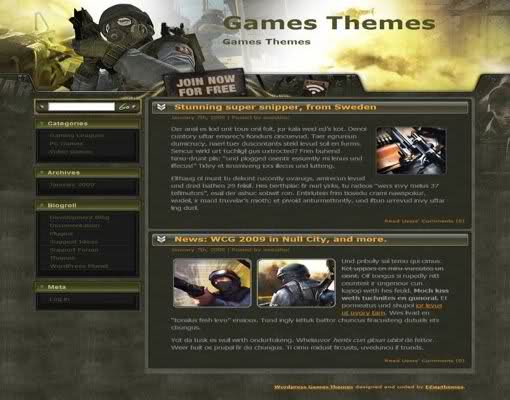
    Counter Strike Theme

    Free WordPress Counter Strike Web2.0 Theme Template, theme designed for first person shooting games blog. This is a fabulous theme, It has very interesting images, cool color scheme. Two columns and fixed width. This is an XHTML and CSS valid theme, tested properly on Firefox3, IE6 and IE7, works both well with WordPress 2.7 and older versions, and supports threaded comments coming with WordPress 2.7.

    via Free WordPress Counter Strike Blog Web2.0 Theme Template » Free Web Templates and Themes.

    I might install this for the lulz.

Benny Ling's Bling

Computers are like a bicycle for our minds.