Tag: freshbytes

  • Freshbytes is dead, long live freshbytes

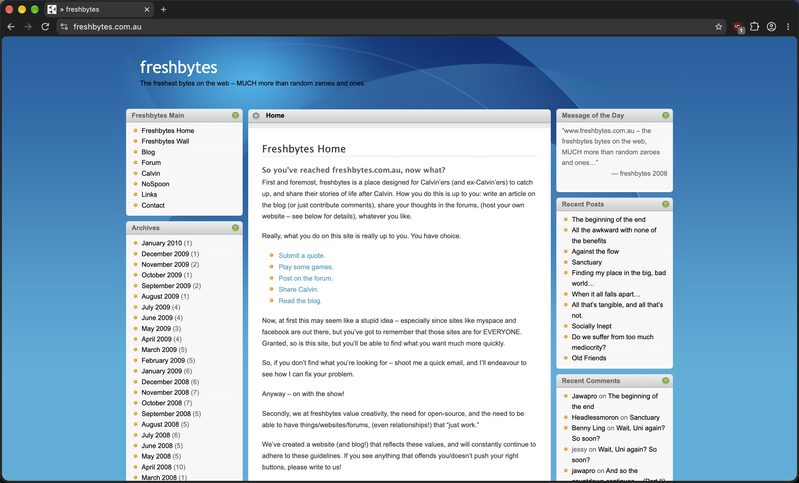
    A screenshot of the freshbytes.com.au homepage, now dutifully preserved

    One of the things I’ve been putting off for years now is what the heck I was going to do with Freshbytes, the first domain I ever owned, and a place with a lot of inane ramblings from high school Benny. And for the past decade or so, that answer has been precisely nothing, besides putting it on the cheapest Australian shared hosting I could find and leaving it there, in the hopes that it would keep working.

    And for most of past decade, that tactic has worked surprisingly well. Freshbytes started off on shared hosting at Bluehost, a cheap and cheerful option for a high school student that didn’t have much disposable income at the time. But eventually, and for reasons lost to time immemorial, maybe around the era where I moved away from the Bluehost and GoDaddy combo, it was moved onshore to the well-regarded Australian hosting provider VentraIP. Then moved again to Zuuver, VentraIP’s lower-cost subsidiary, and when Zuuver was eventually folded back into VentraIP, that’s where it has been for the past few years. Time is a flat circle, after all. But sometime in between all that, probably when the Zuuver to VentraIP migration happened, the DNS stopped pointing at whatever server it was being hosted on, and that meant going to Freshbytes stopped being served to the general public. After all, it’s always DNS. Or so the saying goes.

    Which probably wasn’t a bad thing, given how it was running a positively ancient version of WordPress and there have been dozens of CVEs in that time. Probably. I haven’t actually looked, because I’m scared to. While the server it was being hosted on had been updated, WordPress itself hadn’t. Really the opposite of the issue that my own blog had, where WordPress had been updated, but the server hadn’t really as much. But the technical aspect was only one side of the story.

    The other side of the coin was me wondering whether I wanted it back up in the first place in its original, early-2010 form. For probably just as long as it was down for, I wondered if it was better to keep something hosted at the domain, a “here-was Freshbytes, a domain name that Benny didn’t come up with, but was his first-ever domain nonetheless”-type story for someone stumbling across it, five, ten, fifteen years from now, instead of whatever inane ramblings and complete nonsense that was on there from that 2006-20210 era. I’m not saying there’s anything too incriminating on there, but there are probably certain takes which I wouldn’t share publicly today. I haven’t looked at those, either.

    But whatever had happened, that’s all in the past now. I started by asking myself: if I wanted to keep Freshbytes working, with close to zero maintenance, for the next decade, what does that look like from a technical point of view? At that stage, WordPress wasn’t entirely out of the question; provided I could transition it to some kind of hosted WordPress platform or service, maybe that could work. At a cost, of course, but it could work.

    It was when I was writing the post about this blog’s move to a new host that it dawned on me: what if I could turn it into a static site? Just plain HTML, CSS, and maybe JS, if required. We’d be removing all the interactivity from the site, but I thought that was a very reasonable trade-off for a site that was only ever going to be archived in a read-only fashion for the next decade. A quick chat with old mate Claude indicated that this was not only possible, but entirely plausible. There was even a WordPress plugin designed to handle the entire thing that would produce static HTML files for us. It likely wouldn’t be perfect, and there would likely be several additional steps that I would need to do afterwards to preserve some semblance of the original site, but it looked like an increasingly viable option.

    Continue Reading
  • Facebook and PayPal join OpenID…so?

    The Facebook Connect experience is simply better than that offered by OpenID, and from a competitive standpoint, Facebook has an opportunity to be the standard identity provider for other websites.

    via Facebook Joins OpenID Foundation; So What?.

    Just when I thought it was pretty much dead – both Facebook and PayPal have now joined the OpenID foundation.

    If you’ve never heard of OpenID before this, you gotta be living under a rock. OpenID allows you to “sign in” to websites using just your OpenID login – so you don’t have to do the whole “registering” process which each and every website you come across.

    In practice, it only works if sites have OpenID access enabled – and it would work far better if it were made as a standard, such as HTML and CSS. That way, every web site that allowed you to login would also allow you to login with your OpenID.

    Sure, we’ve enabled both Facebook Connect and OpenID login over at freshbytes, but I don’t really see the point of Facebook joining especially since it has it’s own Facebook connect implementation of secure login.

    And PayPal? Well, it really does go to show that PayPal still has some clout. Needless to say, it’s imperative that the OpenID security right on this one – and from past experience, OpenID is a little clumsy to use, compared to something like Facebook Connect…

    Comments below.

  • Google Analytics is AWESOME!

    Tis been quite a while since we had a “iA!” post over here, and inbetween all the CES/Engadget/1000 RSS items, it’s been quite insane. I guess that just comes about from trying to do 1 MILLION things at once.

    Just between you and me, though, I’m heaps glad that I get to go to a place with scarce internet access. Although I hate to think of how my inbox and RSS feedreader will look like when I get back (over 1000 news items in NetNewsWire was not cool… I blame you, CES, Macworld, and Engadget!), it’s going to be great – no constant pressure to “do stuff”, just the constant “chill” of a (decidedly, well-deserved) holiday.

    Anyway, today I’m here to talk about Google Analytics and why it’s awesome.

    So… got a website? Need to have grossly detailed analysis of your website visitors, as well as such arcane statistics such as bounce rate, average time on site, browser capabilites, connection speeds, hostnames, screen resolutions, and literally all that jazz?

    If so, Google Analytics is your friend.

    Quick explanation: Analytics is a website monitoring tool. At it’s most basic level, it will tell you how many “hits” your website has got over a monthly period (you can adjust the time period), how many page views, how many pages per visit. In addition to this, the Dashboard tells you how long the average user spends on your site – as well as the percentage of new visits.

    Diving in a little further, or just scrolling down the Dashboard reveals even more info – Map Overlays (where all your visits come from, drilled down to city), Traffic Sources (where all your visitors come from, eg direct traffic, search engines, referring sites), and Content Overview (which tells you what pages got how many hits).

    But wait, there’s more!

    Much, much, much more. I’ll be the first to admit that I don’t use the vast majority of Analytics – there is a LOT of as-yet unharnessed power in it. Stuff that I wouldn’t bother with.

    For instance, in the Visitors drilldown, we have an absolute plethora of information about your visitors, from what web-browser and operating system combination they used to visit your website, how many colours their screen could display, what resolution their screen was, as well as what version of flash and java they had.

    In addition to this, there are Traffic Sources, Content, and Goals drilldowns as well, with the same level of in-depth information as the Visitors tab.

    In a way, Google Analytics is scary. It manages to collect all this information from a small JavaScript embedded in a web page, which of course has to be embedded in all of your web pages that you want tracked.

    As you may very well know, WordPress powers both freshbytes and this website, Benny Ling’s BLING. With WordPress, you can’t directly manipulate the HTML of a webpage, as it is automatically generated by the WordPress engine iteself. Instead, you have to add a Plugin to WordPress – for both freshbytes and this website, I’m using the Google Analytics for WordPress plugin. Using this plugin couldn’t be simpler – install, put in your Tracking Code (Analytics will supply you with this), and boom, you’re done. This plugin will also track any outbound clicks, as well as any downloaded documents.

    It’s thanks to Analytics that I can see that this website has seen a 275% increase in visitors over the past month, with a 337% increase over the past week. That’s not a bad effort, actually.

    So, how did that happen? Massive, massive pimpage. Ever since the introduction of Press This, blogging has actually become enjoyable. Wading though the crap to see what is, and isn’t bloggable still isn’t as enjoyable, but Press This makes blogging… easy. Write interesting articles on your website. Get people to read them by pimping them wherever, whenever possible. Share the link in Facebook. Stick it as your status message. Tweet it. Whatever.

    Last but not least… I still cannot figure out why the article I blogged about a while ago about the wife who set her husbands genitals on fire with metho (the husband, unsurprinsgly, died as a result) is still the most popular article on this website. Wait – my apologies. It seems that that article has now been pipped by the Seven reasons the Palm Pre is better than the iPhone article I did. The Macworld 2009 keynote summary I wrote (at 6:15am, right after the keynote itself :o) was also pretty popular.

    Google Analytics is highly recommended if you run any kind of website yourself, or for a client, or whatever. Get it, you won’t regret it! Can’t argue with the price either – the best things in life really are free 😀

  • Connect with Facebook Connect

    Connect with Facebook Connect.

    So, you might have seen the huge “Login using Facebook” button on the sidebar. It’s right below the freshbytes logo, and when you click it, it logs you into this site with your Facebook profile. Don’t worry, I don’t automatically download all of your profile pics or anything freaky like that, nor can I change any of your settings, view anything you don’t want me to view, or invade your privacy in any way, it’s just an easier way for you to comment without having a login for freshbytes.

    Simply put, if you have facebook, you can now post comments on this site without logging into this site.

    In the interests of full disclosure, any comments you post to Facebook will now be posted to your Facebook wall if you choose to login via the Facebook Connect button.

    In my original testing of this new WordPress Plugin, I found it irritating that the profile page borked the layout of the site. However, this has now been fixed, and the profile page now shows in the correct location.

    Yet the only annoying thing that remains is the fact that if you choose to logout of freshbytes (when you’re logged in via facebook connect) is that you also get logged out of facebook. It’s something I want to try and fix, as it’s completely not cool, but as of this moment, I really can’t be bothered diving into the code to get that done. If I have to deal with it, so do you. 😀

    At the end of the day, it’s completely up to you whether you use this plugin or not. Use it, don’t use it, hey, I don’t care.

    It would be awesome if I could get some more people in the “Last Visitors” column, though.

    AHAHA! Epic fail on my part. Oops.

    In a fit reminiscent of the fail whale, I managed to publish this post to the wrong blog… Epic lulz. How does that happen, anyway?! 😛

    If you want, you can read the full post over at freshbytes. Hit this link up for more.

  • Sociable! » Facebook Connect WordPress Plugin

    WordPress plugin that allows direct integration of WordPress blogs with Facebook using Facebook Connect:

    * Build a community

    * Login using your Facebook account

    * Send comments to Facebook profile feed

    * Invite your friends to the blog community

    * See last visitors

    via Sociable! – The Social Media Blog » Facebook Connect WordPress Plugin.

    Thanks to Sociable!, freshbytes now has the ultimate in Facebook integration. Now, whenever you comment on freshbytes (and you’ve logged in via the FaceBook connect button), your comment will show up on your Wall – thus telling the world that you’re a fan of freshbytes.

    It’s just an easier way to connect, I guess.

    Bear in mind that the freshbytes implementation is only-half-broken – the profile page messes up the layout of the site, but I’ll try and fix that when I have some more free time, as it’s no small job.

    Meanwhile, jump over there and check it out for yourself.

    www.freshbytes.com.au

  • Benny’s WTF for the day…

    Wow, three FOUR posts in one day! I must be insane…

    Anyway – check this out! I was looking at the bandwidth that our hosting has been using (seeing as three websites are being hosted from it) and I noticed this…

    Well, that’s more than weird – that’s actually impossible.

    I’m fairly sure the Internet didn’t exist in 1969, and freshbytes certainly didn’t, so… CAN SOMEONE PLEASE EXPLAIN THIS SCREENSHOT?!

    And that, dear readers, is Benny’s WTF for the day.

Benny Ling's Bling

Computers are like a bicycle for our minds.