• Twitter is AWESOME!

    No, seriously. Twiter is awesome.

    I’ve joined Twitter, and you should too.

    At first I was a little sceptical; after all, it is yet another social network that I have to join… I didn’t really see the point of it – what can you say in a 140-character update that can’t be said in a blog post, for example?

    As time went on, however, I watched the video on the Twitter website, and saw that Twitter was designed to update people in-between your blog posts. (I guess one of my WordPress gripes is the fact that it doesn’t really offer a facility to publish snappy one-liners like Tumblr can.) With Uni attendance, soon came the realisation that there were things that needed to be said that I couldn’t whip up a blog post for even if I tried (it takes far too much time, for one).

    With my iPhone on me all the time, and the constant internet connectivity, joining Twitter was a no-brainer. Now, whenever I see any hot chick walking down the hallway, I can jump on my iPhone, type in something crazy like “Hot chick at 12 O’Clock. Uni FTW.”, decide against taking a picture and uploading it to TwitPic, and also deciding against finding her MySpace/Facebook profile and linking it via a URL-shortening service like bit.ly – all within a couple of minutes.

    Finding a good Twitter client for the iPhone is a totally different ball game, though. Thanks to the awesome iLounge article that reviews all 23 Twitter apps on the app store, I tried to decide between Twiteriffic (free), TwitterFon (free), and Tweetie ($4).

    Twitteriffic was almost instantly ruled out – although it was free, it was also ad-supported. Bleh. I persevered with it, though – and was rewarded with a pleasant interface, simple UI, and a serious lack of features. Delete!

    TwitterFon was next. Being a freebie, I didn’t expect too much, but I was surprised with an excellent UI (about equal with Tweetie), features crammed up every tab and button, and an excellent set of URL-shortening and TwitPic-uploading features, as well as the impressive geo-awareness. A couple of things turned me off, though – doing some actions can be a pain, requiring you to navigate though a plethora of screens to reach the button that you want, you can’t see what the @reply tweets are in reply to, and you can’t reply to a tweet directly from the tweetlist.
    It’s not all doom and gloom for TwiterFon, though – the ability to see unread tweets in the tab-navigation interface at the bottom is excellent, colour-coded tabs are a nice touch, as are the excellent search facilities – including trends, location-based search, as well as a search history. Other handy trick is the ability to post an @reply by selecting the person being replied to from a list, as well as being able to stick a Google Maps link to your current location into your tweet (supposedly this works, I just tried it, and it didn’t for me).Overall, a very close second to Tweetie.

    Tweetie – sure, it’s a paid Twitter app, but it’s one of the best. Supporting multiple Twitter accounts, an extremely polished interface (shadows and sliding animations galore), as well as the handy technique of loading just the picture from TwitPic links, and URL-shortening via bit.ly (my URL-shortener of choice). Slide across a tweet, and you get options to reply, view the profile of the tweeter, and mark the tweet as a favourite. Tweeting features are pretty much stock – character counter, upload a photo to TwitPic, and insert a Google Maps link to your current location (with automatic bit.ly URL shortening, ZOMG), or the option to update your profile location. The profile page is especially powerful – having separate buttons for followers and following tweeps for that person.
    One of my only gripes about Tweetie is that it doesn’t have the unread item counts in the tab-bar at the bottom. This is especially annoying, as it means you can easily miss an @reply or a Direct Message.
    UPDATE: One other thing about Tweetie that I thought was pretty fail was that it doesn’t allow you to enter the @ character as a character for your password. Whenever you try, it simply returns a “you must not enter your email address in this field” error, or something similar… Seriously. I like having secure passwords, and Tweetie forced me to change my Twitted password to something less secure. That’s a huge fail in my book, although I think I can attribute this one to a “feature” of the Twitter API, rather than a fail on Tweetie’s behalf.
    While the different tabs in Tweetie aren’t colour-coded, the different kinds of tweets are. Those containing an @reply to you are a darker grey than standard tweets, and your own tweets are a pale orange. Overall, Tweetie wins – followed very closely by TwitterFon (besides, TwitterFon just looks weird when you’re looking at what client people are using to tweet… 😛 ).

    So, follow me on Twitter. You can find me at twitter.com/bennyling

    That’s it – comments below.

    PS – the SS Fail Whale? Where did that come from? I’ve never had a Twitter Fail.
  • 6 Year Old Kid is Next Zinedine Zidane

    This video is no longer available on YouTube, but you can try a Google search for it.

    YouTube – Madin Mohamed 6 Year Old New Zidane in the Making Tracked by Europe’s Elite..

    Massively impressive.

  • Star Wars “Imperial March” On Tesla Coil

    YouTube – ArcAttack Star Wars Imperial theme Chattacon 34 2009.

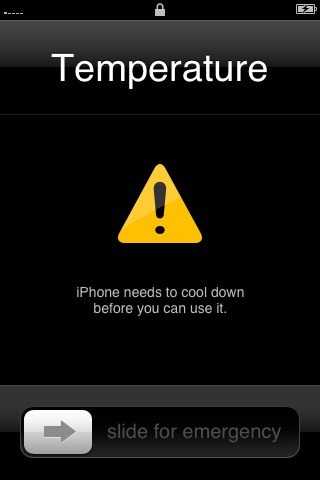
  • Keeping iPhone 3G within acceptable operating temperatures

    Temperature

    This message appears when the operating temperature has become too hot. This is a safety mechanism that protects the components of your iPhone 3G. If this message appears, you should turn iPhone 3G off, move it to a cooler environment, and allow it to cool before resuming use.

    via Keeping iPhone 3G within acceptable operating temperatures.

    If you see this message, it’s probably time to splurge on an air-conditioner.

    …or a move to Antartica.

  • 16 Links – The Catchup Edition

    Right, so I actually hate it when I leave my computer alone for a day. It pretty much gaurantees that I’m gonna have 1500+ RSS items to read the next time I’m on, which means a solid hour of looking through them, trying to find ones good enough to post up on here. In any case, I’ve somehow managed to find 16 that are worthy of your attention today, in between all the Uni stuff, and all that. So enjoy. Or else.

    6 Dreams Jobs That Would Actually Suck
    Yet another list from Cracked. Interestingly, it’s all on the one page, instead of the idiotic “12 items spread over 4 pages” deal that they usually do. Props to them.

    Usability Analysis of Apple.Com
    It’s not so much usability, as it is transparency. If a site is usable, then all those “features” of usability will also be transparent to the user – if some site is harping on about how “usable” it is, then it probably isn’t.

    A Pic of Some Girl’s Tee
    While some would consider this inappropriate, what’s so inappropriate about a girl with a T-Shirt that says she loves G9? I have a couple of mates that love the Logitech G9, as well. (Thanks, Digg). Bonus points if you thought the other meaning – then noticed the amount of tatts on her arms. Ugh.

    A Sith Lord Timeline
    As much as I hate to admit this, I’m not that huge a fan of the Sith. Maybe it’s the fact that they’re all evil, or maybe i’s because all of them seem to adorn strange headgear – either way, the Dark Side just doesn’t do it for me.

    I Survived The Bush Administration
    …and all I got was: (tick all that apply)
    crippling national debt
    diminished civil liberties
    illegally wiretapped
    my shoes stolen at the airport
    cavity searched
    invaded
    imprisoned without charge
    abducted, then tortured
    an economy in crisis
    …AND this lousy T-shirt. (Thanks, Digg.)

    How-To: Watch Movies In Your Terminal Window
    This comes to you courtesy of Stupid Geek Tricks. The quality is horrendous, I wouldn’t recommed it. Also note that this trick is for Linux users only.

    BBBBBBRRRRRRRAAAAAAAIIIIINNNNNSSSSS!
    Funny. Comic.

    The 30 Best Features of Windows 7
    Most of these are actual valid features, unlike the “Why Windows  is better than Mac” article from the same people. Most of these features are also the reason that I’ll be running a Windows 7 gaming machine. Ooh, yeah.

    iTunes App Sorting Concept
    Apple – this would have worked from the beginning. Please, I’m sick of manually sorting apps on my iPhone, and it’s a major pain when you’ve got a couple of very full homescreens.

    7 Ways To Make Your Laptop Battery Last Longer
    Seriously? I expected “hacks”, not a list of common sense reasons.

    Top 10 Halo 3 Kills, #15
    An excellent montage of excellent Halo 3 kills. I had no idea some people could be so accurate with the sniper rifle!

    The Kogan Agora, Android-phone.
    Is it just me, or does that look like it’s made of incredibly cheap plastic? Fail.

    Googly-Eyes Clock
    If I could only figure out how to tell the time on them.

    AT-AT Boombox
    It’s awesome.

    Space Invader Ice Cubes
    Because you can, that’s why. And personally, why the hell not?

    Why does this iBook have a BSOD?
    Who knows. In any case, it’s a marketing fail. Everyone knows that iBooks can’t run Windows, therefore, no BSOD is possible.

    Phew – that’s it. Apologies if my comments were getting a little rash as I approched the end – sometimes, you just have to click on the link to find out for yourself.

    Comments below.

  • Wait, what?

    A screenshot from the MacBook Pro specs page from 2009 with the word "yeah" after the built-in AirPort Extreme specs

    via What websites do you own? – MacTalk Forums.

    Your lulz for the day has arrived, sir. 😀

    See for yourself:

    http://www.apple.com/au/macbookpro/specs.html#communications

Benny Ling's Bling

Computers are like a bicycle for our minds.