Author: Benny Ling

  • The Logitech MX Master

    According to the dates I just punched into Wolfram Alpha, it’s been over 20 months since Logitech released the MX Master. I’ve wanted their flagship consumer wireless mouse for almost as long, and as of earlier this week, am now the proud owner of a MX Master of my very own.

    The last time I looked for a wireless mouse replacement, it was out of necessity. An attempted cleaning and repair of a scrolling issue on my old Logitech Anywhere MX may have merely exacerbated or outright sparked a tracking issue, but regardless of what happened, the end result was that tracking became awful. So awful, in fact, it rendered the mouse inoperable, with replacement the only recourse. After examining the pros and cons of different models, I procured a replacement of the exact same model, and everything was hunky-dory.

    Then Logitech released the MX Master, and I immediately knew what my next mouse was going to be. The MX Master is everything the Anywhere MX was, for the most part, and had enough of the features that I liked about it that I’d consider it an upgrade. The argument could be made that some aspects are compromises in one way or another, or even side-grades, but what about the overall package?

    MX Master on the left, Anywhere MX on the right. Pikachu in the back.

    For starters, the MX Master is almost twice the size of the Anywhere MX. It’s also nicely sculpted for right-handed usage, and probably ergonomically “better”, whatever that means. Because of how much taller the mouse is, the “palm” part of the mouse where it meets your palm is much further off the surface of the desk than I’m used to, which means using a fingertip grip isn’t as easy as it was the Anywhere MX. It’s partly because the diminutive size of the Anywhere MX lent itself to being used with a fingertip as much as it did with a palm grip, and partly because the larger size and shape of the MX Master means you’re more inclined to use it with a palm-style grip. While you could use a fingertip grip with the MX Master, the position and placement of the vertical scroll wheel, as forward as it is on the mouse, means that you either need longer fingers or position your entire hand further up on the mouse in more of a palm grip.

    While I’ve always been a “fingertip grip” user for the mouse that I use with my Mac (my primary computer which gets used for everything bar gaming), I’ve always used a palm grip when gaming. I suspect that I’ll get used to palming the mouse that I use for general web browsing, but for now it’s a little awkward, especially given the vertically asymmetrical design of the mouse which means that it’s not quite a standard palm grip. For now, even trying to wrap my hand around the entire mouse feels incredibly awkward. The “ridge” of the mouse — the thickest part of the mouse — that sits underneath the knuckle of your index finger feels far too large, and I’m yet to find a comfortable position when gripping the mouse. It’s possible that my hands are too small for the larger size of the MX Master, but on the other hand (pun not intended), maybe I’m just holding it wrong.

    As much as I used to like the fact that the Anywhere MX used AA batteries, over the months it became apparent that having to charge AA batteries and always keeping some charged spares for when the ones I was using in the mouse died was all a bit of an inconvenience. If the rechargeable Li-ion pack in the MX Master means I don’t have to deal with scrambling to find some charged AAs right when I need them most, then I’m all for it. Hopefully the quick charge time of the MX Master also means I’ll be able to plug the mouse in for a minute or two to get me enough charge to last me through a quick browsing session, too.

    Continue Reading

  • Well Wrapped Christmas Gift Giving Materialism

    I enjoy wrapping presents. There’s something about the methodical nature that appeals to me. There’s a lot that goes into it, and it’s not just about choosing an appropriately festive wrapping paper. It’s about making sure the wrapping paper has as few creases as possible, that any application of sticky tape fits into the overall wrapping aesthetic, and that all your creases and folds are deliberate to produce a well-wrapped gift.

    There’s something special about a well-wrapped gift, because it means someone has put as much thought into the presentation as much as they have the contents. Even if it’s just going to be torn apart and ripped to shreds by the recipient, a well-wrapped gift can say a lot about you as a person.

    Imagine my disappointment when a shopping centre gift-wrapping volunteer did a truly average job of wrapping a rectangular prism, arguably the easiest package of all to wrap. The wrapping paper was nice enough and all, but the wrapping itself was sloppy; not carefully wrapped, but a perfect rectangular prism turned into an almost shapeless form, with no edges visible, air gaps, and bunched up wrapping paper all over the place. I would’ve thought that they’d have some practice at wrapping given the number of shoppers, but maybe that wasn’t the case. At least my donation went to charity.

    Choosing gifts is fun, too. The IT department at work did a “stealing santa” this year, which is kind of like secret santa, except you’re buying a gift for every participant instead of an individual. The $15-20 limit on presented a challenge in terms of what to get, because I wanted to get something that was serious and a joke. The perfect gift!

    But then I decided that full cheese was the go, so the hunt began. Sadly, an IT-related “for dummies” book was outside of the budget, as was the book of Kim Kardashian selfies. I ruled out a neon-coloured rock-painting kit (including rocks), a bright green WTF pillow, and even the book of Kim Kardashian quotes was ruled out due to being under budget. I eventually settled on a harmonica, which turned out to be a surprise hit (maybe one of the older guys wanted it for their kids or something, I don’t know). I’ve always wanted one, and going off the advice of the organiser who said that you could absolutely get something that you wanted, I eventually settled on it as my secret santa gift. I ended up with a box of Roses, which was good enough for me.

    Continue Reading

  • A fine, perfectly OK, not-too-shabby, backpack

    img_3352

    There are two pieces of fashion I truly care about. OK, maybe three. Jackets, backpacks, and wallets, in that order. Jackets are, well, they’re jackets, along with all the versatility and variety that comes with the garment. Jackets are capable, casual, and my only regret is that moving to Brisbane has meant to less jacket-wearing than cooler climates. But it’s fine, I just need different jackets — see what I mean?

    On the other hand, wallets are a little more personal. Because you keep all of your personal stuff in your wallet, your personality is kind of reflected in your wallet. It kind of has to, when it carries around your ID, your credit cards, and whatever else you deem necessary to have with you day-to-day. Does your wallet reflect your minimal lifestyle, or have you packed in every bit of loose change and every scrap of a receipt that you’ve ever been given, until one day it just explodes all over the place and forces you to clean it up? Like I said, wallets are personal, as evidenced by our discussion on the topic on AppleTalk.

    And because guys can’t go around carrying handbags due to certain social stigmas, but occasionally also require something to hold all the extras they need for their day, backpacks are the only suitable solution. Backpacks are there for guys that need to haul around their laptop to and from work. They’re there for the guys that need to carry a change of clothes, or want to bring a few odds and ends about with them without resorting to the fashion faux pas of cargo shorts. In short, backpacks are the guy’s handbag.

    Continue Reading

  • Now With More HTTPS

    Ever since Let’s Encrypt announced free SSL certificates (albeit with a few caveats, more on this below), I’ve wanted to make the change to serving web pages on this blog securely. Last night I finally buckled down and got it done. After a small mishap that involved the accidental removal of my Nginx configuration file (a droplet backup saved me from certain disaster), I generated a cert following the pretty great tutorial from Digital Ocean.

    A few notes on the process:

    • For people just running a self-hosted WordPress blog, there’s zero WordPress-side configuration you have to do, which kind of surprised me. I thought I was going to have do at least install some kind of WordPress plugin, but it turns out enabling HTTPS is all dependent on your web server software. For Nginx, it’s a few lines in your site’s configuration file, and presto, HTTP over SSL (once you’ve gotten past the hurdle of generating your cert).

    • One of the first issues I ran into was the certbot not recognising my domain, returning a 403 Forbidden when it attempted to authenticate that I owned the domain in question. At first I thought this was because the DNS changes I made hadn’t propagated yet, but then I realised it was one of my Nginx access rules (the only preventing access to any file or directory starting with a period) that was preventing certbot from accessing my domain. A quick Nginx configuration change fixed that issue – I’m still not sure if it will need to access the well-known directory again when it attempts to renew the certificate, but we’ll know in about 89 days.

    • Yeah, Let’s Encrypt only issues certs that are valid for 90 days. But it’s not such a big deal, because there’s a handy way to renew your cert that you can even put in cron for true set-and-forget functionality. It’s not the annual or multiple-year certificate that you’d get from a more established CA, but you’re also not paying anything.

    • Once I had generated the cert, updated my Nginx configuration, and restarted Nginx with the new config, my blog wouldn’t load — the connection would just time out when attempting to load it in a browser, and curl via Terminal told a similar story. I scratched my head at this a little, until I discovered that my server’s firewall was blocking port 443. Oops. Bit of a rookie mistake there, and what made it even more difficult to diagnose was how I had set Nginx to redirect HTTP traffic on port 80 to port 443 — pretty standard practice when enabling HTTPS, but it made troubleshooting the issue more difficult.

    Anyway, my blog now scores an A+ on Qualys’ site SSL testing suite, and all I have to do is turn think of some other stuff to write about, so there’s actually something to serve over HTTPS.

    Update Dec 30, 2016: After discovering that (some? if not all) posts with images were being served as mixed content, I used this sql update statement on this page to update all my wp-content links in posts to be served over TLS. I also updated my site URL in settings, so hopefully everything should be hunky-dory.

    Or… maybe not. I just realised that there’s probably a tonne of pages (mostly from the now-defunct Posterous) that would have been being served over HTTP. Still not sure what I want to do with those Posterous posts, as images as broken on all of them at the moment.

  • My favourite portable console

    IMG_3658

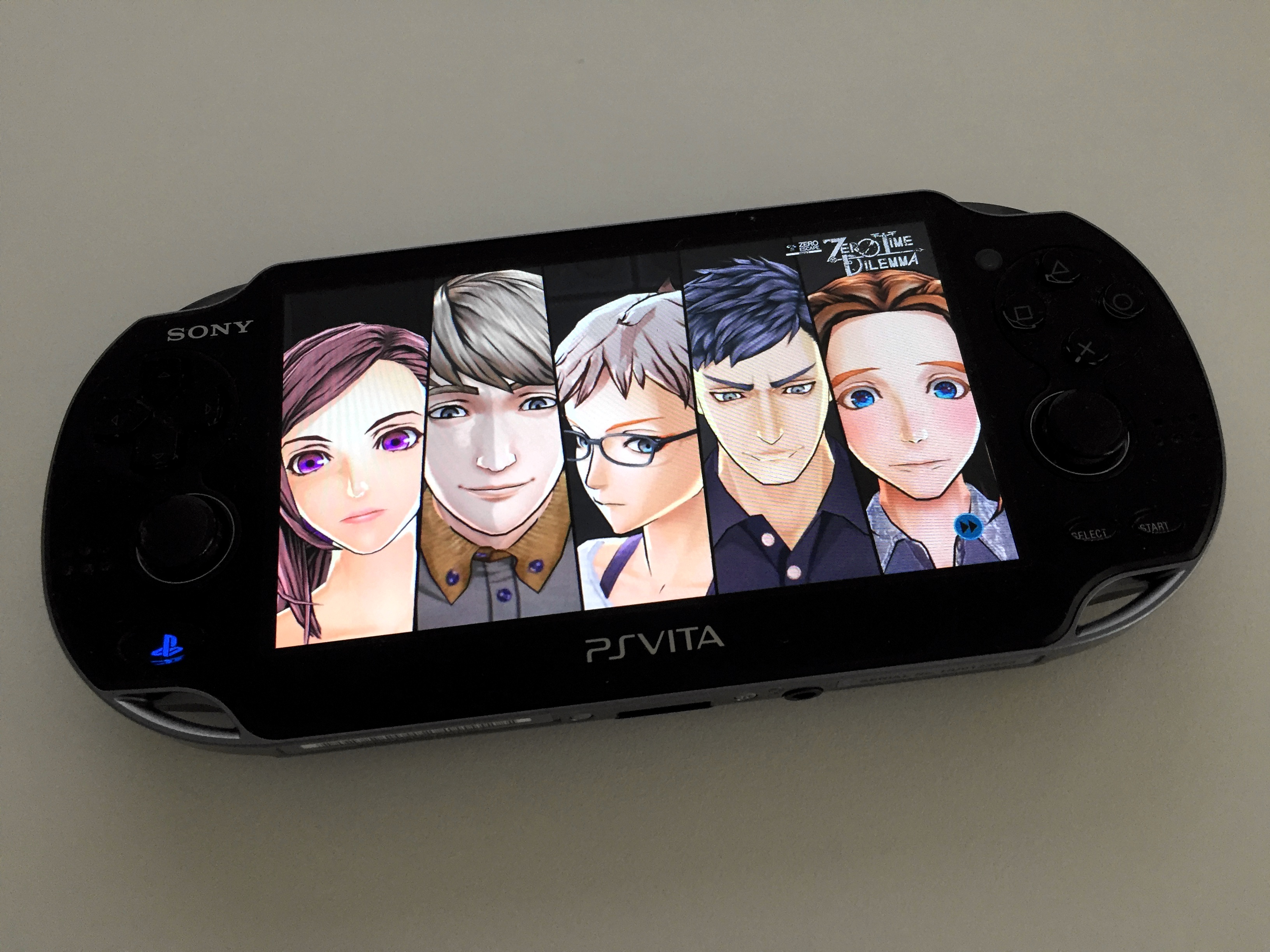
    I picked up Zero Time Dilemma last week on the PS Vita, and it’s really reminded me why the PS Vita is my favourite console. While Nintendo’s 3DS lineup may edge out the Vita in terms of social integrations (StreetPass is a hell of a thing), the PS Vita remains the more “serious”, the more mature console. Not because it doesn’t have a cutesy interface like the 3DS, but because it lacks the simplifications of the 3DS that make it the more appealing to a younger audience.

    Like a lot of 90’s kids, I grew up on Nintendo. My friends had the Nintendo 64, I eventually got a GameCube, and there were various portables interspersed throughout all that. The Game Boy Color introduced me to portable gaming, and by the time the Game Boy Advance SP rolled around, I was hooked. (I borrowed a friend’s Game Boy Advance for a few weeks, which was pretty cool, but I never had one of my own.) I picked up the original 3DS when it came out, but by that time I had more or less outgrown portable gaming, eschewing it in favour of these new-fangled “computers”.

    Fast forward a few years. I haven’t played Pokémon for far too long, but I get the chance to acquire some 3DS hardware for cheap. I jump at the opportunity, with the intention of sating my desire to catch pocket monsters for another decade or so, publishing a series of posts about the fun I was going to have. Unfortunately, whether it was due to Poké-fatigue or something else, I never ended up finishing Pokémon Y.

    Somehow, I ended up buying a PS Vita in the middle of that. I imported it from the US due to Sony being much more lenient with their region-locking than Nintendo was, and I spent a good chunk of time in Persona 4 Golden which I later wrote about.

    By the same token, the growing library of titles on the 3DS meant that it was now a compelling purchase. I remember reading about Fire Emblem Awakening somewhere, and feeling it was a good a time as any to jump in, I imported a 3DS XL from the US along with a physical copy of Fire Emblem Awakening.

    The 3DS XL was pretty great, despite Nintendo’s insistence on region-locking its titles. My imported 3DS meant I was never going to be able to walk into my local EB and pick up a 3DS game on a whim, but I was OK with that, thanks to increased digital availability of titles. I took my 3DS XL to PAX Aus the first and second times, and StreetPass really came into its own as the ultimate social drawcard, even if it meant walking around holding the right shoulder button and giving A a solid workout.

    But for all of the 3DS’s many compelling titles and social integrations, there’s always been something off about Nintendo’s portable console. I can’t quite put my finger on it, but it feels as though the 3DS is still a console for kids — maybe because it is — but it means that there’s this feeling of something missing. As in, why isn’t there any easy way to take screenshots on the device to save moments in-game? In a world of super-high resolution displays, why are the screens on the 3DS still the same low-res that we were seeing five, ten years ago? And that’s not even talking about the seldom-used 3D feature — although it’s cool that Nintendo has come up with a way for glasses-free 3D to work in a portable console, the fact that 3D cuts the resolution in half should mean Nintendo would want to be cramming the highest quality display possible into the 3DS, at least for the upper display.

    Continue Reading

  • Which platform do I play this on?

    It's been two and half years since I last played my Vita. Bonus points if you can name the games.
    It’s been two and half years since I last played my Vita. Bonus points if you can name the games.

    One of the best things about modern gaming is being able to choose what platform to play something on. Console exclusives have more or less died out apart from a few titles that I’m not really that interested in anyway, and I can probably count the number of games that I want to play that aren’t on a platform I own on one hand, so life is pretty good when it comes to choosing which platform I want to play something on.

    Nine of out ten times, I’ll choose to play something on PC. I have a reasonably powerful gaming PC that’s purpose-built for the task, so putting all that graphics power to the task of pushing some pixels around is more productive than having it just sit around, looking pretty. Playing on PC means I get all the extra goodies that come with PC gaming: ShadowPlay to record in-game footage I want to watch later, and Steam integration for screenshots and for when I feel like being social and playing with friends (or to see what my friends are playing).

    Note that I don’t have a current-gen console at the moment, either. I used to have an Xbox 360 and a PS3, but I left those behind in Hobart when I moved to Brisbane in 2015. Some times I miss those consoles — there’s still a few PS3 games I’d like to play through — but for the most part, I haven’t felt like I’m missing out on anything by not having a console. Besides, these days I’m playing way too much Dota to get stuck into anything else.

    When Zero Time Dilemma came out at the start of July this year, I faced a dilemma: which platform should I be playing this on? I immediately purchased it on Steam due to the fact that it was the first title in the series that was available on PC. I didn’t have much of a choice with 999. Although you can play 999 on iOS these days, it lacks the puzzles of the 3DS version which I played through a few years ago. For Zero Time Escape, I went with the Vita version for something a little different.

    I tried playing Zero Time Dilemma on the PC, I really did. But the advantages of the PC platform just weren’t there. It’s not a bad port, per se, but using a mouse and keyboard for what is generally a pretty hands-off game/visual novel interspersed with puzzle sections felt wrong somehow, like I was doing more work than just playing the game.

    I could have gone with Zero Time Dilemma on the 3DS, too. I generally like the cutesy nature of the New 3DS, and Nintendo’s insistence on keeping games on their own platform forces my hand more often than I’d like. But here, the lack of an actual screenshot function would have let me down if I ever wanted to do a little write up — if I can’t go back and review the screenshots of the game I’ve played, did I ever really play it?

    So it was settled. I asked my sister to ship me my PS Vita that I bought back in March 2012, and as soon as I arranged for some US PSN credit and downloaded Zero Time Dilemma, I knew I had made the right choice.

Benny Ling's Bling

Computers are like a bicycle for our minds.